
Treble1.0 - App Store
You'll be able to see results in few seconds.
Publisher Description
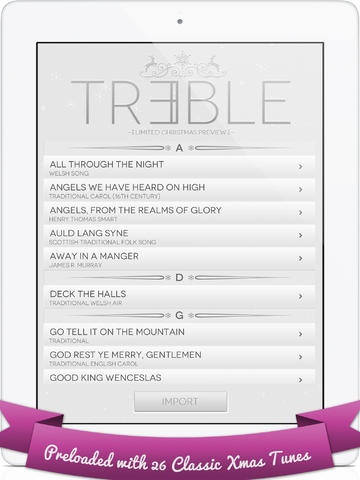
Discover TREBLE with a SPECIAL CHRISTMAS LAUNCH EDITION
Perform and sing your favorite Christmas songs with this advanced sheet music reader
Note: This app does NOT play music, but provides the lyrics and notes to enable you to play the songs yourself on an instrument
FEATURES:
Preloaded with 25 Christmas songs
Transpose any score to any key
Pinch to zoom in and out to maximize reading capability
Customize the number of bars onscreen
Instructions on how to create your own content
Sing along to crystalline lyrics
Beautifully designed Christmas theme
Really simple easy-to-use to use interface
Get more songs for free on TREBLE s Facebook community page
Easily share your own scores or playlists with other users via TREBLE s community page
Tutorial for easy instructions on how to create your own content
TREBLE s Fanpage: www.facebook.com/trebleapp
HOLIDAY SONGLIST INCLUDED IN THE APP:
Angels We Have Heard on High
Angels from the Realms of Glory
All Through the Night
Auld Lang Syne
Away in a Manger
Deck the Halls
Go, Tell It on the Mountain
God Rest Ye Merry Gentlemen
Good King Wenceslas
Greensleeves
Hark! The Herald Angels Sing
In the Bleak Mid-winter
I Saw Three Ships
It Came Upon the Midnight Clear
Jingle Bells
Joy To the World
O Christmas Tree
O Little Town of Bethlehem
Silent Night
The First Noel
The Holly and the Ivy
There s a Song in the Air
The Twelve Days of Christmas
Up on the Housetop
We Three Kings
We Wish You a Merry Christmas
Merry Christmas and Happy New Year from the TREBLE Team
Requires iOS 5.1 or later. Compatible with iPad.
About Treble
The company that develops Treble is Paperplane Pilots Pte Ltd. The latest version released by its developer is 1.0.
To install Treble on your iOS device, just click the green Continue To App button above to start the installation process. The app is listed on our website since 2012-12-16 and was downloaded 0 times. We have already checked if the download link is safe, however for your own protection we recommend that you scan the downloaded app with your antivirus. Your antivirus may detect the Treble as malware if the download link is broken.
How to install Treble on your iOS device:
- Click on the Continue To App button on our website. This will redirect you to the App Store.
- Once the Treble is shown in the iTunes listing of your iOS device, you can start its download and installation. Tap on the GET button to the right of the app to start downloading it.
- If you are not logged-in the iOS appstore app, you'll be prompted for your your Apple ID and/or password.
- After Treble is downloaded, you'll see an INSTALL button to the right. Tap on it to start the actual installation of the iOS app.
- Once installation is finished you can tap on the OPEN button to start it. Its icon will also be added to your device home screen.
Program Details
System requirements
Download information
Pricing
Version History
version 1.0
posted on 2012-12-16
Disclaimer
Official App Store Link
We do not host Treble on our servers. We did not scan it for viruses, adware, spyware or other type of malware. This app is hosted by Apple and passed their terms and conditions to be listed there. We recommend caution when installing it.
The App Store link for Treble is provided to you by apps112.com without any warranties, representations or guarantees of any kind, so access it at your own risk.
If you have questions regarding this particular app contact the publisher directly. For questions about the functionalities of apps112.com contact us.
